 DogByte by KalisPro
New Twitch and Kick clips on Discord
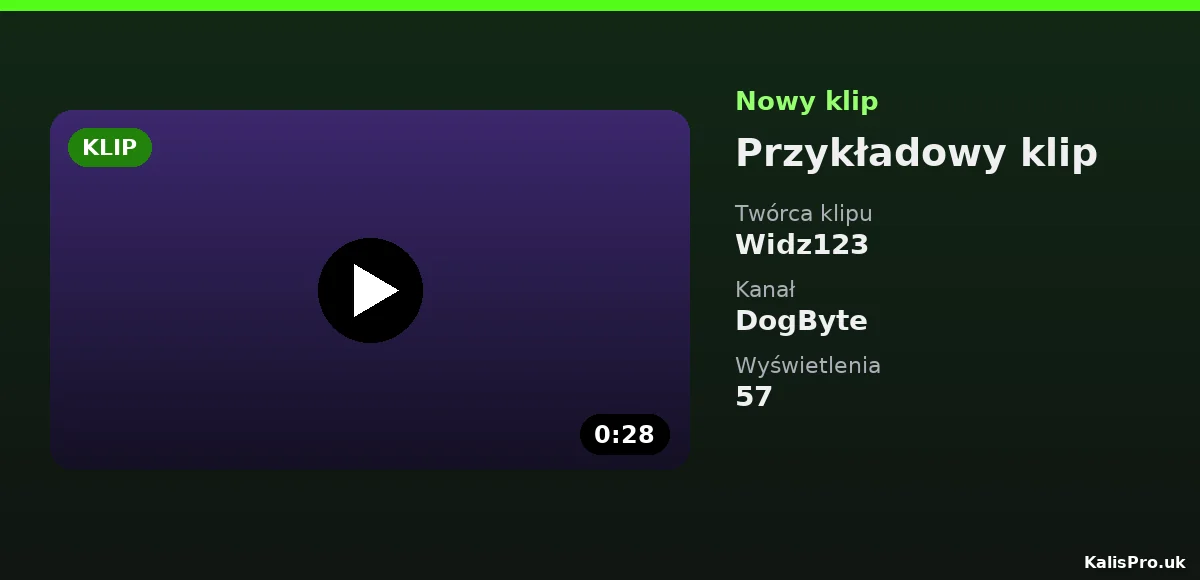
When someone clips your stream on Twitch or Kick, DogByte posts the clip to a channel on your server: a graphic with the title, the person who made it and the views, plus a “Watch the clip” button. Clips that already existed before you turned it on are skipped.
What you need
- DogByte on your server and the Manage Server permission,
- your channel name from twitch.tv/name or kick.com/name,
- a text channel for clips, for example
#clips.
Twitch clips
- Pick the clips channel. Type:
If the channel is already on the list (for live alerts), the same command only adds clips. Live alerts stay as they were./twitch add login:yourname clips_channel:#clips - Check the look.
/twitch show login:yournameshows the newest clip as the bot will post it. If there is no clip yet, you see a sample.
Kick clips
- Pick the clips channel. Type:
You can paste the whole kick.com address as the name. The same works with/kick clips name:yourname channel:#clips/kick add name:yourname clips_channel:#clips. - Check the look.
/kick showshows the newest clip from Kick with its graphic.
What the clip message looks like
The text says “New clip on {name}'s channel” (on Kick: “New Kick clip on {name}'s channel”), and below it there is a graphic with the clip thumbnail, the title, who made it and how long it is. The view count on the graphic is updated twice: 24 hours and 7 days after the clip was posted, so popular clips show their real numbers.
Clips do not ping anyone. If you want a ping, use a separate channel for clips and let people follow it.
The same in the dashboard
You can set it all without commands in the dashboard. In Twitch and Kick each channel has a New clips field: pick a channel or leave it off.


Common problems
Old clips did not show up
That is on purpose. When you turn clips on, DogByte remembers the clips that are already there and posts only the new ones, so your channel is not flooded.
A new clip came a few minutes late
The bot checks for new clips every minute, but Twitch and Kick need a few minutes before a fresh clip shows up for apps.
Turning clips off
/twitch clear login:yourname what:Clips (on Kick /kick clear) stops clips. Live alerts keep working.